The calendar that protects your time.
DayWarden keeps work and personal life apart, holds the hours you set aside, and turns a sentence in any language into an event. It works with the calendars already on your phone.

Coming soon to iPhone and Android.
Free to use. Plus is $3.49 a month, with a 14-day free trial. iPhone, iPad, Apple Watch and Android.
- No account needed to start
- Your meetings never reach our servers
Work and personal
Leave work at work.
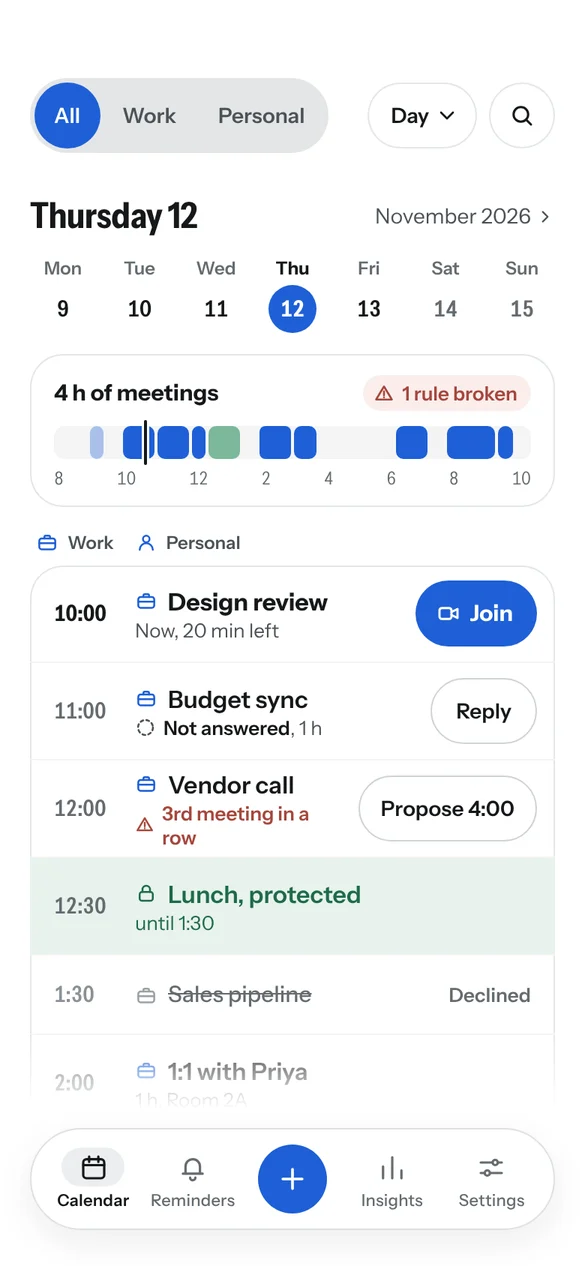
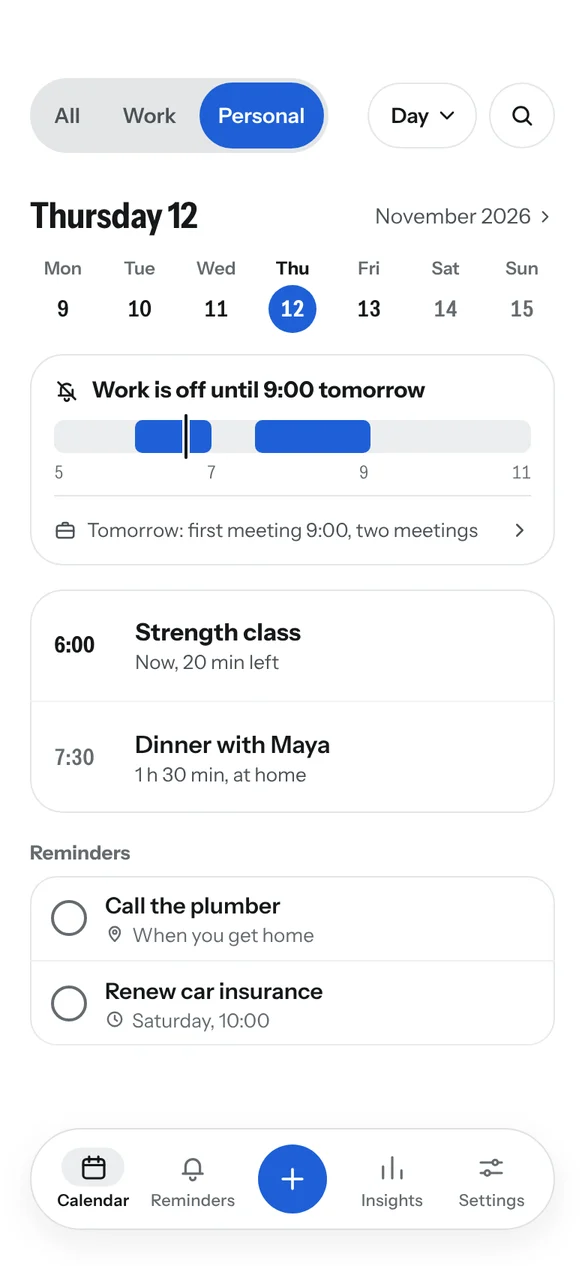
After hours, your calendar shows your evening, not tomorrow's meetings. One tap brings work back when you want it.
- All, Work and Personal views. See everything together, or one side at a time.
- Your week, your way. Set your own working days, hours and the day your week starts.
- Quiet evenings. Work reminders can stay silent outside working hours.
Rules
Set your rules once. DayWarden keeps them.
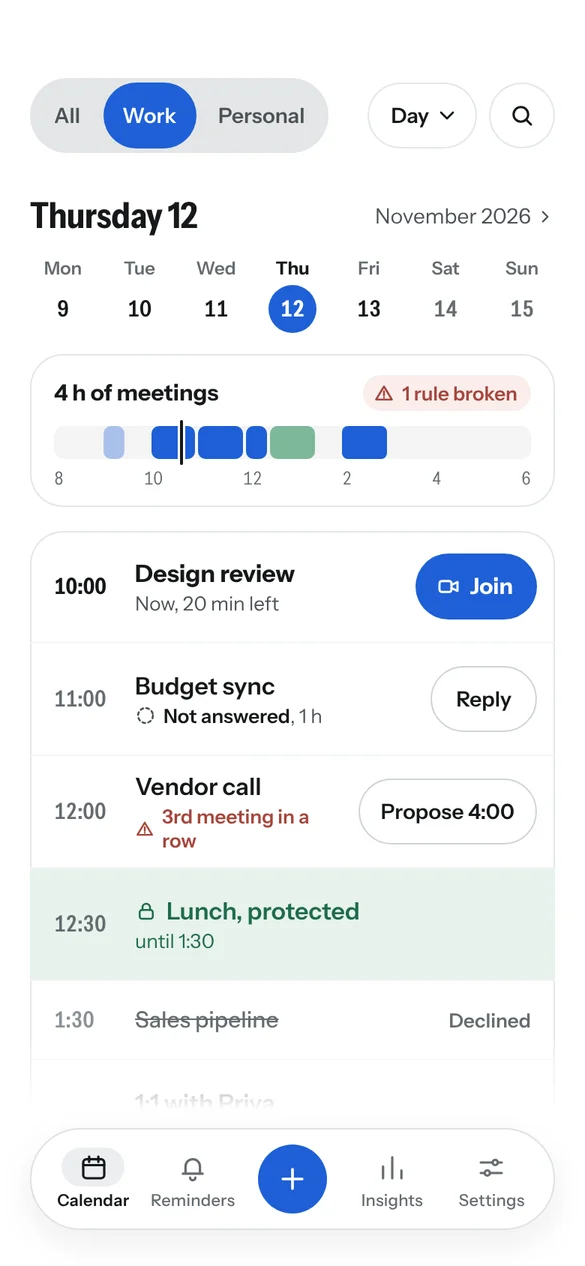
Say how you want your days to go. DayWarden checks every meeting against it and gives you a way out when one doesn't fit.
- Protect what matters. Keep lunch free, cap meetings in a row, set a cut-off time.
- A better time, ready to send. When a meeting breaks a rule, you get the nearest slot that works and a drafted reply.
- You stay in charge. DayWarden never declines or moves a meeting for you.
Adding events
Add it in your own words.
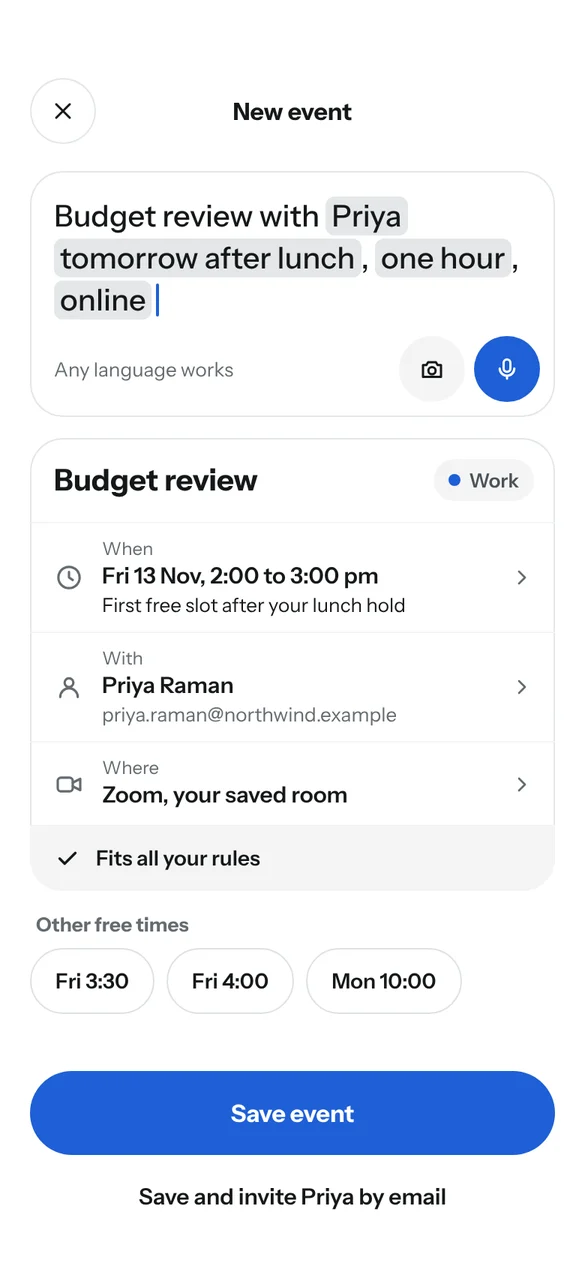
Type "Budget review with Priya tomorrow after lunch, one hour, online" and the event is filled in. You check it and save.
- In any language. Write the way you normally do.
- Speak it or snap it. With Plus, say several events at once, or turn a photo of a ticket into an event.
- Nothing saved without you. Every event is a draft until you confirm it.
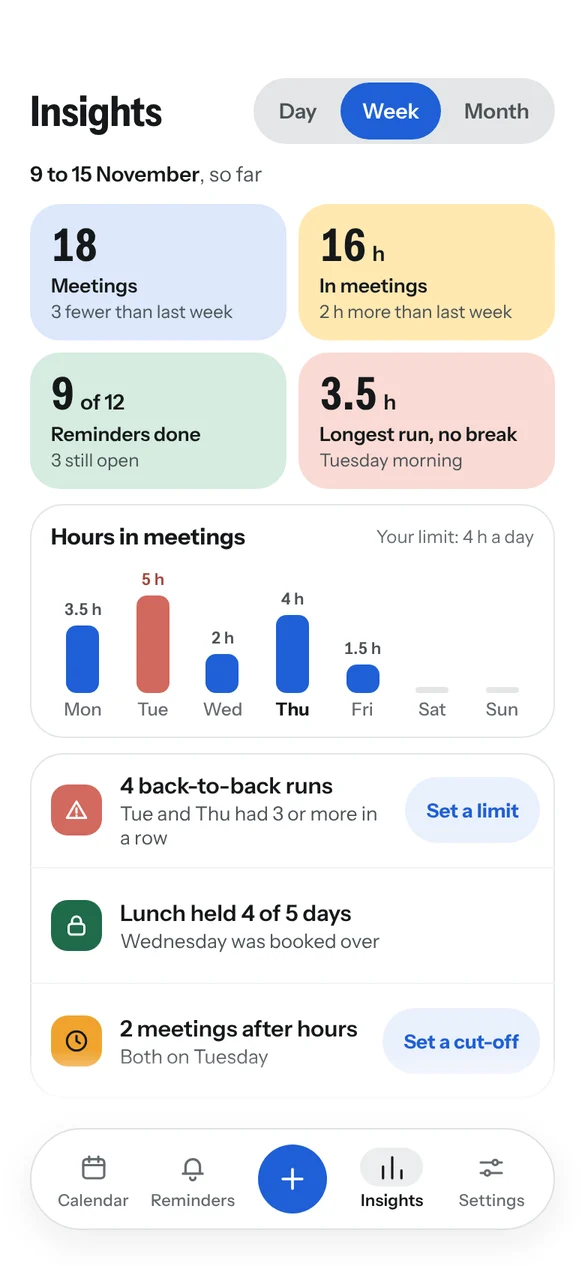
Insights
See where your time goes.
A clear weekly picture of your meetings and reminders, with practical suggestions instead of guilt.
- Your week in numbers. Meetings, hours, reminders done, and your longest stretch without a break.
- One tap from insight to rule. Too many back-to-back days? Set a limit on the spot.
- Worked out on your phone. Your meeting details are not sent anywhere to produce it.
The everyday things, done well.
Reminders that know where you are
"Call the plumber" appears when you get home. Timed reminders too.
Invitations at a glance
Accepted, not answered and declined meetings each look different, everywhere.
Overlaps flagged
Double-booked? It's called out in the list, in words.
Join in one tap
A Join button on any meeting with a Zoom, Meet, Teams or Webex link.
Widgets, watch and tablet
Home screen widgets, an Apple Watch app, and layouts made for iPad and Android tablets.
The same on every device
A free account keeps your rules, reminders and settings in step across iPhone and Android.
How we're different.
Many calendar apps put one platform first, or keep the useful parts behind a paywall. DayWarden does neither.
iPhone and Android, equally
The same app on iPhone, iPad, Apple Watch, and Android phones, tablets and foldables. Not a port, and never second best on either.
Switch phones, keep everything
Moving from iPhone to Android, or back? A free account brings your rules, reminders, places and Plus with you.
A free plan that's a real calendar
Typed entry in any language with no limit, a rule that watches your time, weekly insights, widgets, the watch app and a direct Google or Outlook connection. Free, with no account needed.
Your meetings never reach us
Events stay with your phone and your calendar provider. They never pass through our servers, even with an account.
Free to use. Plus when you want more.
The free app is a complete calendar. Plus adds unlimited rules that act for you, and tools that save time every week.
Free
- Every calendar already on your phone
- All, Work and Personal views
- Typed entry in any language, unlimited
- One rule that warns you, such as a protected lunch
- One Google or Outlook account connected directly
- Reminders, including at Home and Work
- Weekly insights, widgets and the watch app
Plus
- Everything in Free
- Unlimited rules of every kind
- Rules that act: protected time held on your calendar, better times and drafted replies
- Share your free times in one message, and hold them until one is picked
- A morning brief of your day, and more Google and Outlook accounts
- One-sentence scheduling with your favorite people and links
- Voice entry and photo to event
- Reminders at any place, monthly insights and advice
Plus is bought through the App Store or Google Play and can be cancelled there at any time.
Private by design.
A calendar holds a lot about your life. DayWarden is built so that most of it never leaves your phone.
Your meetings stay with your calendar
Events are read from your phone's own calendar. They are never sent to or stored on our servers.
Your calendar, your control
DayWarden reads the calendars on your phone. If you connect Google directly, your phone talks to Google itself, and your events never pass through our servers.
The assistant only drafts
Nothing is saved, changed or sent until you confirm it. What you type is not kept after the reply.
An account is your choice
Use the app without one. A free account syncs your rules, reminders and settings, never your meetings.
Questions
Which calendars does it work with?
Any calendar your phone already shows, including Google, iCloud and Microsoft. You can also connect Google Calendar directly in DayWarden.
Do I need to create an account?
No. The app works without one. A free account is there if you want your rules, reminders and settings on more than one device.
Is it really free?
Yes. The free app is a complete calendar with one rule that warns you. Plus adds unlimited rules that act for you, sharing your free times, voice and photo entry and more, with a 14-day free trial.
Will it decline or move my meetings?
Never. DayWarden warns you, and with Plus it suggests a better time and drafts a reply. You decide what to send.
Which devices does it run on?
iPhone, iPad, Apple Watch, and Android phones and tablets.
What languages can I type in?
The app's menus are in English. When adding an event, you can write in any language.
Take your day back.
DayWarden is free. Set your first rule in two minutes.
Coming soon to iPhone and Android.